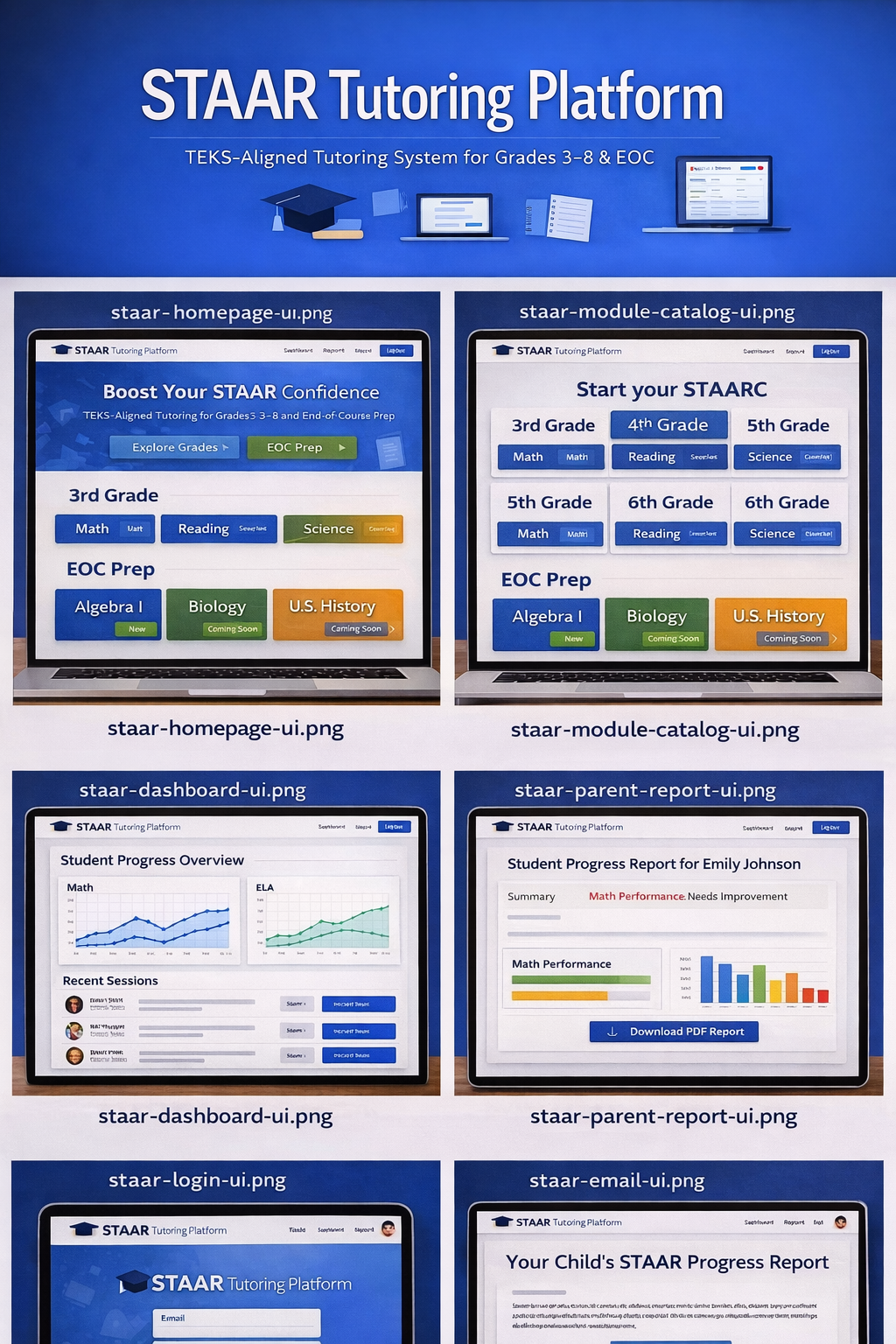
Module catalog
Grade and subject tiles with soft shadows and generous spacing—students pick a pathway without hunting through menus.
A complete, TEKS-aligned tutoring system for Grades 3–8 and EOC—designed to bring clarity to student learning, visibility to teachers, and confidence to families.
STAAR tutoring helps students prepare for Texas state assessments by focusing on TEKS-aligned skills in reading, math, and science. This platform provides structured practice, real-time feedback, and progress tracking to ensure students meet state standards.
The Texas Essential Knowledge and Skills (TEKS) define what students should learn at each grade level. This platform ensures every lesson, assessment, and report is aligned to TEKS standards for measurable growth.
Pair platform-style programs with one-on-one online K–12 tutoring services when your family wants direct reading, math, or test-prep instruction.
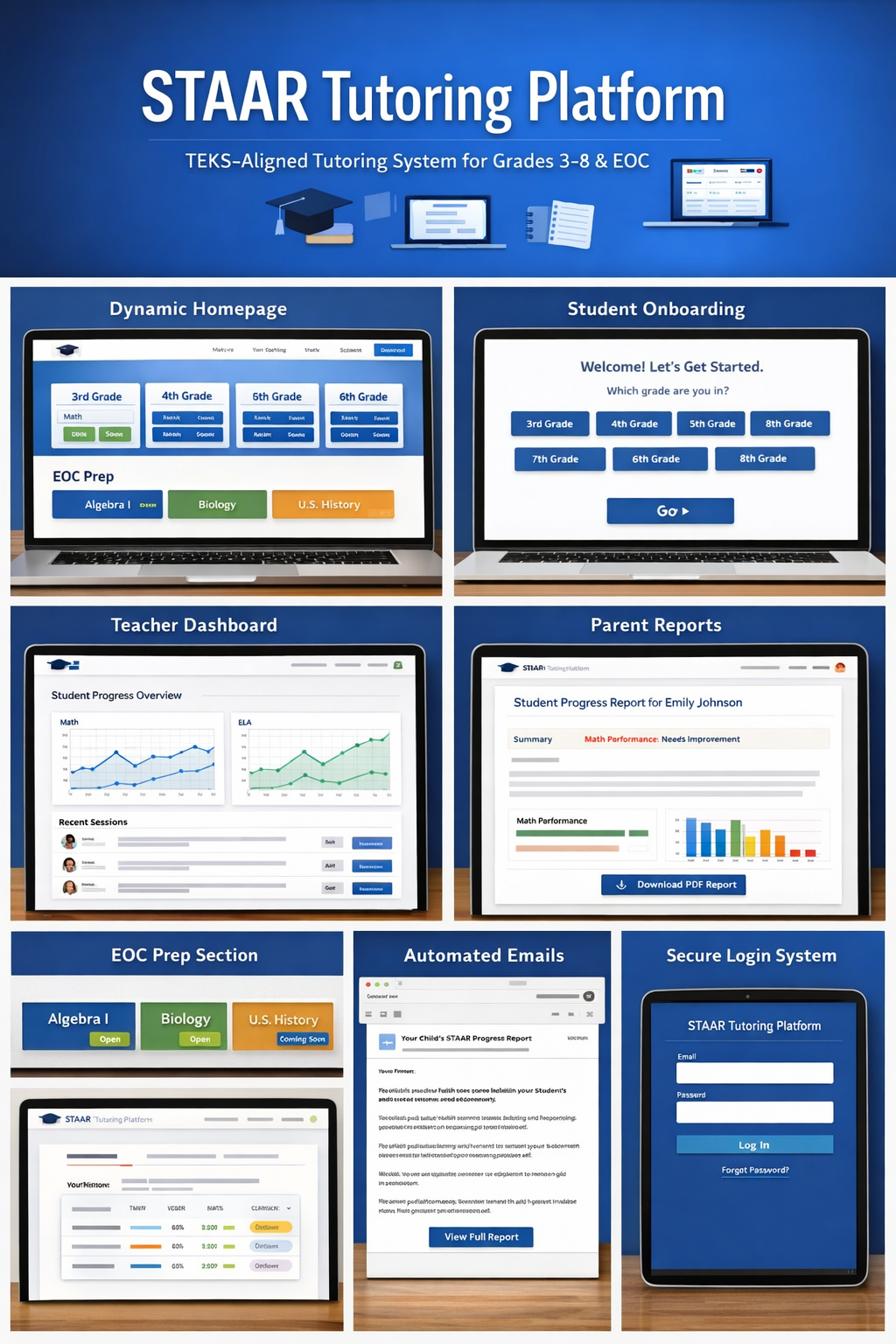
The overview graphic above maps the full journey—from the dynamic grade and subject homepage through onboarding, dashboards, family reporting, and secure login on laptops and tablets. High-school EOC work is evolving, including expanding high-school EOC tracks such as Algebra I, with additional subjects in development; reference artwork may show courses before they are live in every deployment.
Families and educators often juggle different grade levels, subjects, and reporting needs at the same time. Paper trails get lost, updates arrive late, and it can be hard to see whether a student is truly closing gaps—or just staying busy.
The goal was to build a system that feels organized, human, and dependable: students know where to go next; teachers can see patterns; parents receive timely, readable updates.
The platform centers on a complete tutoring engine tied to TEKS expectations, paired with workflows that match how real schools and homes operate: students get the right module for their grade and subject; teachers review progress with simple analytics; parents receive PDF summaries and email updates without having to ask.
Instruction and practice aligned to standards—so time on task maps to what classrooms expect.
Homepage-style grade cards (e.g., 3rd–6th) with Math, Reading, and Science entry points—plus dedicated EOC prep lanes.
A friendly Welcome flow asks which grade the student is in (3–8), then moves them forward with a single, obvious Go action.
Student Progress Overview with line graphs for Math and ELA, plus a Recent Sessions list with clear statuses (e.g., in progress, ready for review).
Personalized Student Progress Report views with summaries, performance callouts, and Download PDF Report—paired with email titled Your Child’s STAAR Progress Report and a View Full Report button.
Branded email and password sign-in, Forgot Password recovery, and layouts that read well on tablets as well as laptops.
The product UI uses a blue gradient and card-based layout tuned for schools. Below, the same design reference is framed in Lifetime Tutors plum and lavender accents—screenshots are not recolored; crops highlight each area of the journey.
Grade and subject tiles with soft shadows and generous spacing—students pick a pathway without hunting through menus.
Data-forward views for class pulse: trends for core subjects and recent activity so educators can act quickly.
Readable summaries and performance visuals, with a clear path to export or share a formal PDF with schools.
Secure entry points that work on larger screens and tablets, with recovery options suited to busy families.
Scheduled messages keep guardians in the loop with a single, obvious next step back into the platform.
The dynamic homepage uses a clean top navigation and a grid of grade-level cards (for example 3rd through 6th grade). Each card opens subject pathways such as Math, Reading, and Science, so learners always know where to start.
EOC preparation is built to grow, including expanding high-school EOC tracks such as Algebra I, with additional subjects in development. Availability can vary by cohort or phase; reference screens may show future courses before they are live everywhere. Module labels such as Open vs. Coming soon make rollout status clear; progress-style tracking shows how readiness is advancing where the module is enabled.
Behind the scenes, modules still load from live data: the hub can grow and change without rebuilding every screen by hand, with room for backward-compatible updates mid-year.
New learners meet a simple Welcome screen that asks, “Which grade are you in?” Large, tappable choices for grades 3–8 reduce friction; a prominent Go button confirms the choice and routes students into the right TEKS-aligned sequence.
Parents see a dedicated Student Progress Report view with a short narrative summary, status callouts (for example where extra support may help), and bar-chart style tracking so trends are obvious at a glance. A Download PDF Report action makes it easy to save or share with schools.
Automated email complements the PDF: families receive messages such as “Your Child’s STAAR Progress Report” with a single, obvious View Full Report button that deep-links back into the platform—so reminders go out on a schedule, not only when someone remembers to send them.
The educator view centers on a Student Progress Overview: line graphs for subjects such as Math and ELA make growth and plateaus easy to spot. A Recent Sessions list shows who was active, with compact status controls (for example In progress or ready for Review) so follow-up stays organized.
Together, these elements support grouping students for intervention, celebrating gains, and adjusting pacing—without burying teachers in raw data tables.
Secure sign-in is shown in the overview graphic on a tablet frame as well as desktop contexts: branded fields for email and password, a primary Log in action, and Forgot password support for real-world account recovery.
Students and parents can move through linked accounts and streamlined family setup where appropriate. Behind the scenes, the system is built to scale as more grades, subjects, or schools come online, with attention to backward compatibility so existing users are not left behind when things improve.
Clear next steps, standards-aligned practice, and less guesswork about “what to do today.”
Readable updates and PDFs that fit into real life—email included.
Better visibility for grouping, coaching, and long-term planning.
For partners and technical reviewers—a concise list of what sits under the hood.
The STAAR Tutoring Platform is designed for real learners, real classrooms, and real results.